How to Change Your Phone Number on Hollywoodbets Account – Complete Guide

Changing your phone number on Hollywoodbets is easy, and you don’t need to contact support. Updating your phone number is crucial to prevent login or withdrawal issues. You also stay updated with Hollywoodbets special offers, like when you win a cash prize. Whether you lost your phone or have switched to a new number, this guide will help you understand how to change cellphone number on Hollywood account.

Bet with Hollywoodbets
1

Why You Might Need to Change Your Phone Number on Hollywoodbets

Hollywood Change Number
How to Change Number on Hollywood Account

Your phone number is directly associated with your Hollywoodbets account. There are several common reasons why you might want to change your Hollywoodbets number or update your details, such as:

  • You got a new phone number after switching SIM cards or upgrading your device;
  • You changed your mobile network provider in South Africa;
  • You want to improve the security of your Hollywoodbets account;
  • You need to update your personal details for accurate withdrawals and communication;
  • You want to continue receiving important Hollywoodbets notifications and updates.

Keeping your cell phone number current ensures you don’t miss account alerts, deposit confirmations, or promotional offers. If you've forgotten your login or are dealing with a lost password, your registered number plays a key role in account recovery.

To make any changes, log in using your existing details or contact the Hollywoodbets support team for help. Updating your number is a quick way to maintain full access to your Hollywoodbets account, just like on other major betting sites.

Bet with Hollywoodbets
2

How to Change Your Phone Number on Hollywoodbets – Step-by-Step Instructions

Hollywoodbets has made it easier to change your cellphone number. Simply follow these quick steps on how to change phone number on Hollywood account.

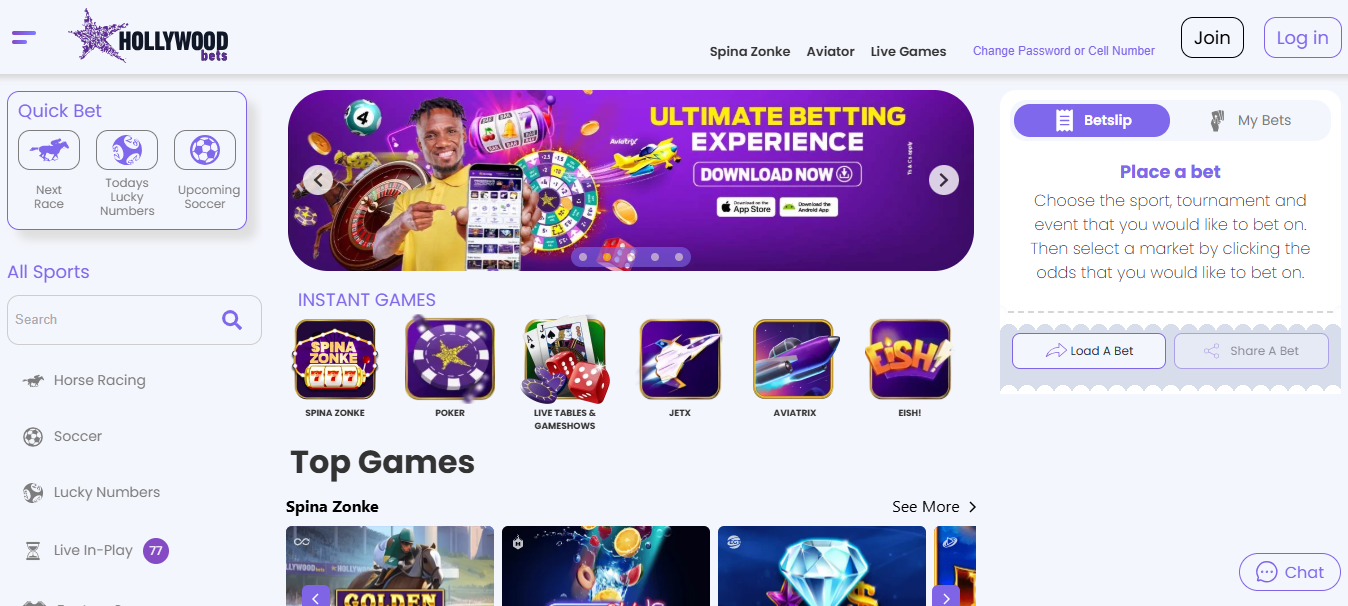
  1. Visit Hollywood Bets SA;
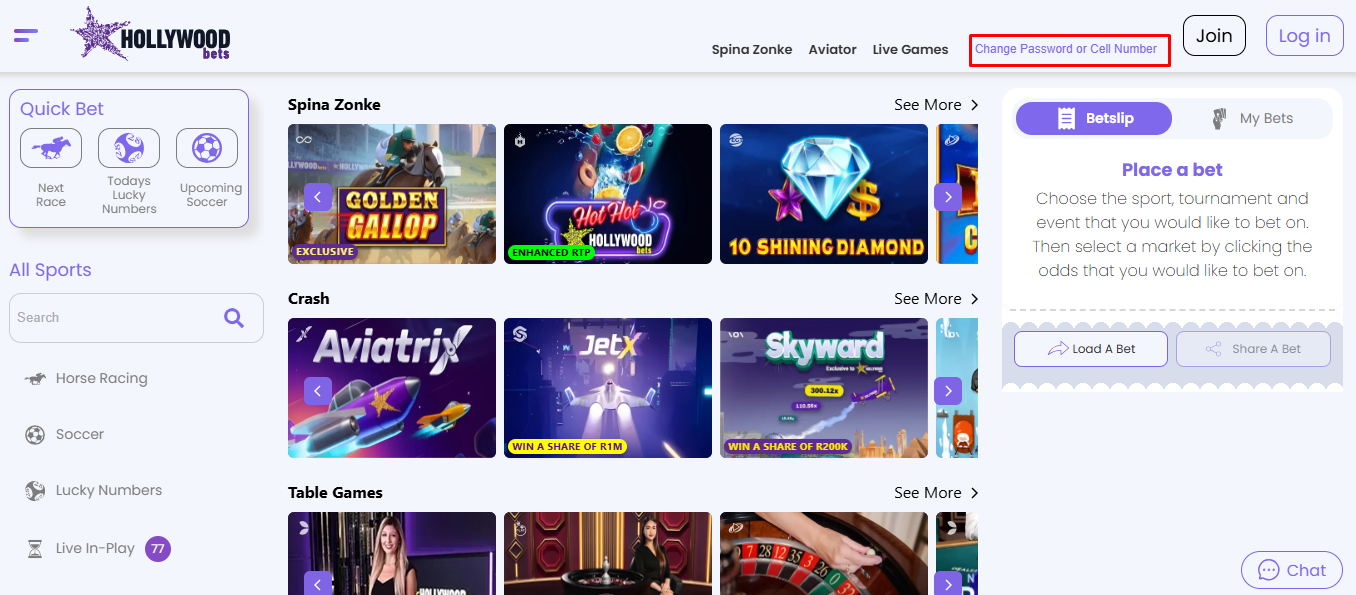
  2. At the top of your screen, click the “Change Password or Cell Number” option;
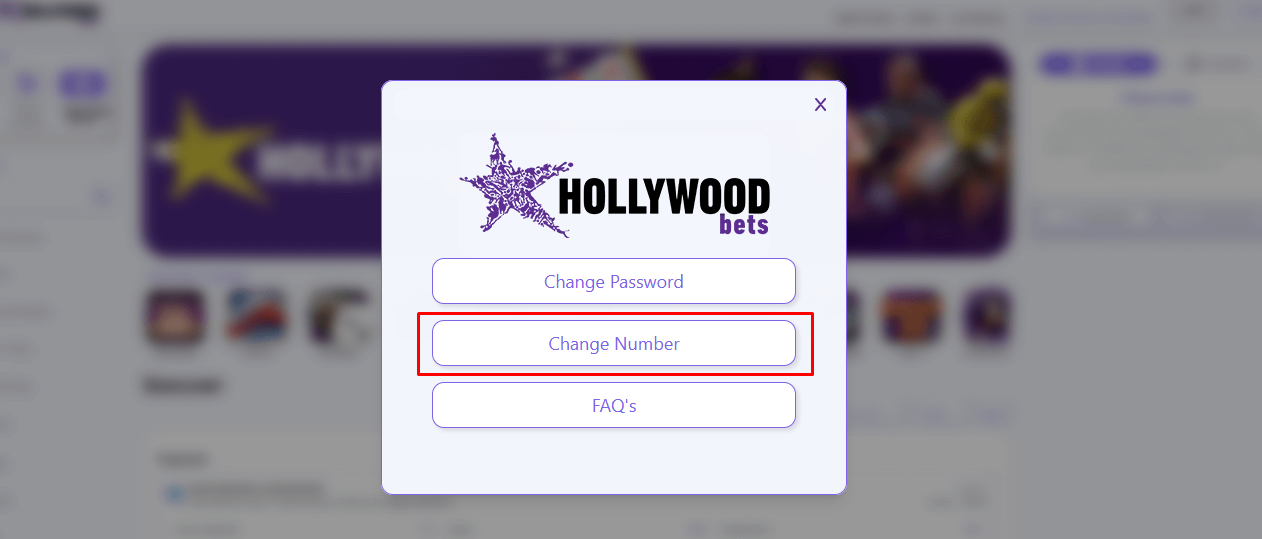
  3. Hollywoodbets Account Updates You will be prompted to “Change Password”, “Change Number” and FAQs. Click Change Number;
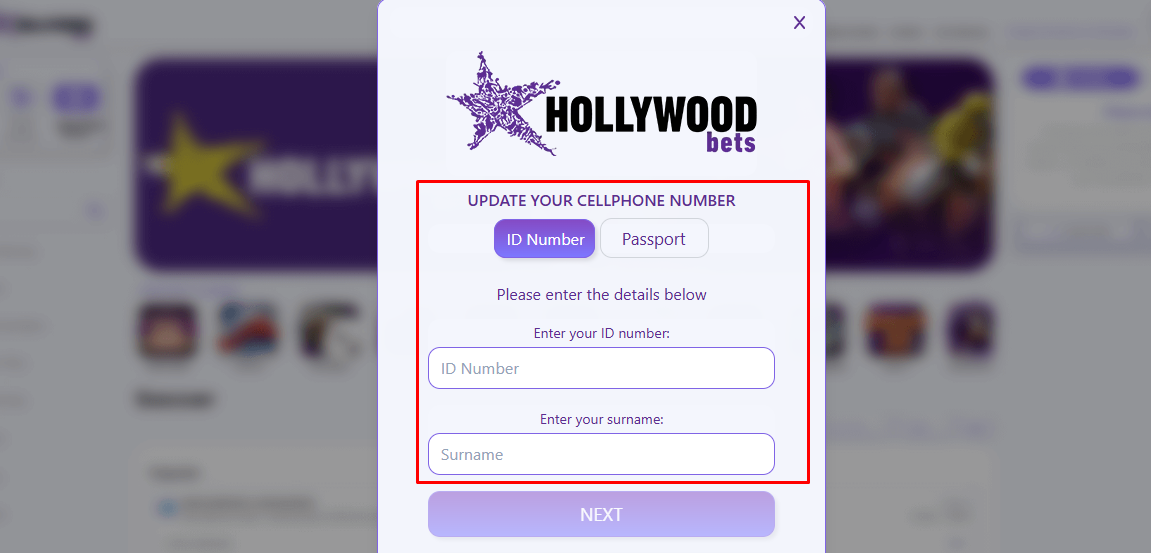
  4. Enter your ID Number/ Passport and your username and click next;
  5. Provide selfie verification and click proceed;
  6. Click Request OTP. Enter the OTP and complete the process.
Change Your Phone Number on Hollywoodbets
3

What to Do If You Can’t Access Your Account to Change Your Number

If you can’t log into your account to change your cell number, don’t worry — you can still recover your Hollywoodbets profile using several secure options. Whether you've forgotten your password, changed your mobile phone number, or no longer have access to your old phone number, Hollywoodbets makes recovery simple.

Follow this step-by-step guide to get back into your online account:


3.1

Hollywoodbets Password Recovery Options

  • Click "Change Password or Cell Number". At the top of the Hollywoodbets login screen, click the relevant link to start the process;
  • Reset Your Password via Email or SMS. Choose a recovery method to receive a verification code on your registered email or mobile phone number;
  • Use Selfie Verification. If you no longer have access to your number, Hollywoodbets offers a selfie verification option to verify your identity;
  • Contact the Support Team. Still locked out? Just contact the support team at the official Hollywoodbets phone number or via live chat. They can help you reset your password, update your login details, or even add a new telephone number to your profile.

Tip: Even if you’ve changed devices or forgot your credentials, you can still change your password and restore full access to your Hollywoodbets account. Want to update other details too? Our full guide on how to change your Hollywoodbets phone number or email explains it all in simple steps.

Need help with Hollywoodbets bonus codes, Hollywoodbets registration, or creating a new username? Check out our FAQ section or the updated guide for Hollywoodbets SA 2026.


4

Updating Your Hollywoodbets Banking Details When You Change Your Phone Number

Once you update your phone number, you should also update your banking information for security purposes and avoid withdrawal delays. If you don’t update your banking information, you might miss out on OTPs for withdrawals and other account alerts. The table below compares how to change phone number vs how to update banking details on Hollywoodbets.


4.1

Hollywoodbets Banking Details Update

ActionHow to change number on hollywoodbets accountHow to update banking details on hollywoodbets
AccessVisit Hollywoodbets website or use the mobile appVisit Hollywoodbets website or use the mobile app
Time required2 to 5 minutes1 to 2 minutes
NavigationClick Change Password or Cell NumberClick My Account and go to Banking
Verification neededEnter your ID number, surname, complete selfie verification, and enter OTP to the new numberEnter the bank information and save
Contact support if you need helpCall 087 353 7634 or email [email protected]Call 087 353 7634 or email [email protected]
Bet with Hollywoodbets
5

How to Reset Your Hollywoodbets Password If Needed

If you forgot your Hollywoodbets password, you can reset your password via email or SMS and access your account. Follow these steps to reset your password.


5.1

How to Reset Password Via SMS

  1. Visit Hollywoodbets website;
  2. At the top right, click Change Password or Cell Number;
  3. Click Change Password;
  4. Choose to reset via SMS;
  5. Enter your ID/Password, and cell number;
  6. Click submit;
  7. Enter your new password and the OTP sent via SMS;
  8. Click Verify and Reset password;

5.2

How to Reset Password Via Email

  1. Visit Hollywoodbets website;
  2. At the top right, click Change Password or Cell Number;
  3. Click Change Password;
  4. Choose to reset your password via email;
  5. Enter your ID/Password, and email address;
  6. Click submit;
  7. Enter your new password and the OTP sent via email. Click Verify and Reset password;
6

Important Tips When Changing Your Number on Hollywoodbets

Here are some easy tips you can follow for a smooth experience when changing your number on Hollywoodbets.

  • Only provide your phone number. You should not register with another person’s phone number;
  • Keep confirmation records, like a screenshot, to confirm the number change;
  • Update your account information regularly;
  • Do not share your account details with another person;
  • Always remember your security questions;
7

How to Contact Hollywoodbets Customer Support for Number Changes

If the steps listed in this guide on how to change cell number on Hollywoodbets don't work, contact customer support for assistance. Here is how to reach Hollywoodbets customer support for number changes:

Social Media:

  • Twitter : @Hollywoodbets;
  • Instagram : @Hollywoodbets;
  • Facebook : @Hollywoodbets;
Bet with Hollywoodbets
8

FAQs

Nothing was found for your query :(
Also ask
Can I change my phone number without logging in?
You need to log in to change your phone number. If you forgot your password, reset your password using email option. Once you reset password, login and click the Change Password or Cell number option to update your phone number.
How long does the update take?
After confirming the verification and entering the OTP, the number is changed right away. However, it can take up to 30 minutes for the process to be confirmed.
Will changing my number affect my bets or balance?
Changing your phone number will not affect your bets or balance. Only your contact details are updated for notifications and OTPs.
How to contact Hollywoodbets support?
You can contact Hollywoodbets support through live chat, email at [email protected], phone 087 353 7634, and on social media.
How do I change my phone number on my Hollywood account?
For Hollywoodbets change phone number, login and click the Change Password or Cell Number, choose Cell number, enter your ID/passport and surname, complete selfie verification, enter your new number and request for an OTP. enter the OTP and confirm.
How do I delete my Hollywood account and register again?
You can delete your Hollywoodbets account by send an email to [email protected]. Include your full names, ID number and why you want to delete your account. To register agan, you need to use new details.
How do I add an account number on Hollywoodbets?
You can add an account number by accessing your account, on the top left, click account number, go to My Account and click Banking. Enter your account details and click Save.
What is the WhatsApp number for Hollywood FICA?
You can submit your FICA documents at any Hollywoodbets branch, email [email protected] or fax the documents to 086 673 2627.
9

Author

Alisa Barladyan
Alisa Barladyan
Editor-in-Chief
Comments
No Comments Yet! Be the first to share what you think!
This website uses cookies
This provides customers with a personalized experience and increases the efficiency of visiting the site, allowing us to provide the most efficient service. By using the website and accepting the terms of the policy, you consent to the use of cookies in accordance with the terms of this policy.