Guide to Changing Your Hollywoodbets Username, Update Password & Hollywoodbets Account Info

Hollywoodbets is one of the most popular bookmakers in South Africa, where users can bet on a wide range of sports and play casino games. For you to bet on the platform, you need to create an account by providing your personal and banking details. At some point, you might need to change your Hollywoodbets username and account name. It could be that you forgot your username, changed your phone number, security reasons, or bonus access issues. While you can change some account information, changing things like your username might require you to contact support. Our step-by-step guide will take you through how to change your Hollywoodbets username & account information.

Change Username on Hollywoodbets
1

Can You Change Your Username on Hollywoodbets?

No, you cannot change your Hollywoodbets username directly through the website or app. When you first register, your username becomes a permanent identifier of your Hollywoodbets account. If you want to change your username — for example, due to a typo or privacy concern — you must go through the official Hollywoodbets change username process by contacting support.

The Hollywood username reset option is not available via the site interface, so contacting an operator is essential. Don’t worry — the process is simple, and your account will stay secure during the update.

2

What Account Details Can You Change?

While the username cannot be changed directly, many other account details can be updated. You can change your Hollywoodbets password, mobile number, and email address using your Hollywoodbets profile settings or through secure verification steps.


2.1

Account Details You Can Change

Account DetailCan I Change?How to Change
Username❌ NoContact Support (apply with ID)
Password✅ YesUse reset link via email or SMS
Mobile Number✅ YesUpdate via profile or reset page
Email Address✅ YesUpdate in account settings
Residential Address✅ YesUpdate via profile or with support
Uploaded Documents✅ YesUpload via profile or send via email
Reset Your Hollywoodbets Password
3

How to Reset Your Hollywoodbets Password (Step-by-Step Guide)

How Do I Recover My Hollywood Account
How to Reset Hollywoodbets Password

I forgot my Hollywood username and password. Can I recover my account? Yes, if you cannot remember your Hollywoodbets password, follow these steps to reset the password.

  1. Visit the Hollywoodbets website from your device;
  2. At the top right, click the ‘Change Password or Cell Number’ link (a purple button);
  3. Select the Change Password option;
  4. Choose how you want to reset — via email or SMS;
  5. For SMS: Enter your ID/passport number and registered cell number;
  6. For email: Enter your ID/passport number and email address;
  7. Click SUBMIT;
  8. You’ll receive a reset code or temporary password via SMS/email;
  9. Use it to log in and create a new, secure password.

Tip: Always use a strong password with numbers, symbols, and letters. Update it regularly for better account safety.

4

Changing Your Mobile Number or Email

How to Retrieve My Hollywood Account
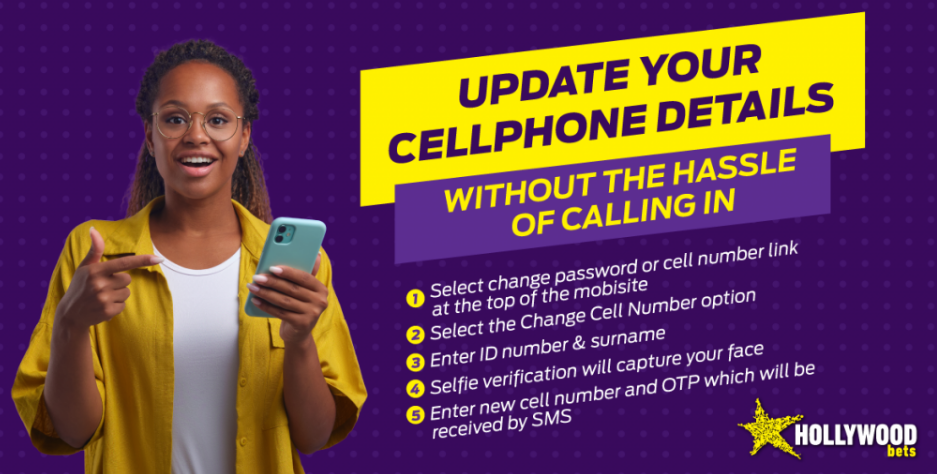
How to Change Number on Hollywood Account

Hollywoodbets makes it easier for users to change their mobile number or email associated with their accounts. Follow these steps to change your mobile number or email.

  1. Log in to your Hollywoodbets account;
  2. Go to “My Account” or Profile in the main menu;
  3. Locate your current mobile number or email;
  4. Click to edit and enter the OTP (one-time code) sent to verify the change.

If your number is linked to banking, you may need to provide additional documents or selfie verification as part of the FICA process.

Reset Your Hollywoodbets Password
5

Where to Find the Right Section for Each Account Update

All account changes are found in the “My Account” section of the Hollywoodbets platform. Whether you want to change your password, mobile number, or upload FICA documents, go to this section to start the process.

Make sure to complete every step on the form and enter accurate information to avoid delays.

6

Contacting Hollywoodbets Support to Update Username or Locked Details

How do I recover my Hollywoodbet account? If your account details are locked or you would like to change your username, you need to contact Hollywoodbets support for help. Such sensitive account information can only be handled by Hollywoodbets support for the security of your account. Hollywoodbets offers several contact options you can choose from as follows:

  • Telephone: 087 353 7634;
  • Email: [email protected];
  • Live Chat: Available 24/7;
  • WhatsApp: Available on the support page

6.1

What to include in your request:

  • Your current username or registered contact details;
  • Reason for the change (e.g. typo, security concern);
  • Government-issued ID copy;
  • Any additional documents (e.g. proof of address, selfie)

This ensures the operator can verify your identity and help update your information immediately.

Reset Your Hollywoodbets Password
7

Documents Required for Account Update or Recovery

To recover or update your Hollywoodbets account, you need to provide verification documents for the support team to handle your issue efficiently. Some of the documents you might be asked to provide include:

  • Government-issued ID (SA ID, passport, driver’s license);
  • Proof of address (utility bill, bank statement, etc. — not older than 3 months);
  • Selfie with ID (may be requested to prevent fraud)

Note: Make sure documents are readable, up-to-date, and match your Hollywoodbets account name. Avoid blurry or altered images — they delay verification.

Hollywoodbets Casino Welcome Bonus
Hollywoodbets Slots
Hollywoodbets Slots
How to Bet on Hollywoodbets
8

Do Account Changes Affect Bonuses?

Yes - if your details are under review, you might temporarily lose access to some Hollywoodbets offers like bonuses or free bets. This is part of the standard verification process to protect your account and comply with regulations.

Caution: Avoid creating multiple accounts. Doing so violates betting site rules and may result in account suspension or permanent bans.

9

Login Troubleshooting: What to Do If You Can’t Access Your Account

If you're unable to log in to your Hollywoodbets account, don’t panic. This can happen due to forgotten passwords, incorrect login details, or locked accounts. In such cases, you’ll need to go through the reset portal and possibly send documents to verify your identity.

Once verified, you'll be able to proceed with account recovery, update your password, and log in again.

You might need to send:

  • A copy of your ID or passport;
  • Selfie with your ID;
  • Any email or phone number linked to your account
Reset Your Hollywoodbets Password
10

FAQ

Nothing was found for your query :(
Also ask
How do I change my username on Hollywood Online?
You must contact support to request a new username. The change is not available in profile settings.
How do you reset your Hollywood username and password?
Password resets are done via the reset portal. For Hollywoodbets username recovery, contact support.
What is the username in a Hollywoodbets account?
It’s typically your registered email address or phone number, used with your password.
How do I delete my Hollywood account and register again?
Email support with your current account details, reason for deletion, and wait for confirmation. To re-register, you’ll need new credentials.
I forgot my Hollywood username and password in South Africa — can I recover it?
Yes. Use the reset link on the website. Choose to reset via SMS or email and follow the instructions.
How do I change my mobile number on Hollywoodbets?
Click Change Password or Cell Number, then follow the on-screen steps to change your number. FICA verification may apply.
What documents are required to update my account?
You’ll need to provide ID and possibly proof of address, especially when recovering a locked account or changing sensitive info.
Can I recover my account if I forget my password?
Yes. Visit the reset portal, choose email or SMS, and continue with the provided code. Then create a new password.
What if I want to change both my mobile and email?
Yes, you can. Do them one at a time in the profile settings.
Can I recover my account without documents?
No. You’ll be asked to send documents to verify ownership.
Will my changes reflect instantly?
Most changes are updated immediately if you’ve passed verification.
11

Author

Alisa Barladyan
Alisa Barladyan
Editor-in-Chief
Comments
No Comments Yet! Be the first to share what you think!
This website uses cookies
This provides customers with a personalized experience and increases the efficiency of visiting the site, allowing us to provide the most efficient service. By using the website and accepting the terms of the policy, you consent to the use of cookies in accordance with the terms of this policy.