FICA Your YesPlay Account: Step-by-Step Document Submission Guide

Users need to provide Yesplay FICA documents for verification after registration. FICA stands for the Financial Intelligence Centre Act, a legal requirement in South Africa that requires players to verify their identity and address on betting platforms like Yesplay to prevent fraud and money laundering. This guide will help you know how to FICA on Yesplay.

Sign up with Yesplay
1

What Is YesPlay FICA and Why Is It Necessary?

FICA Your Account
Yesplay Verification

YesPlay FICA refers to the process of verifying your identity and address as required by South African law to comply with anti-money laundering regulations. To successfully complete the FICA verification, users must upload documents such as a valid ID and proof of address through the YesPlay platform.

The FICA verification process is mandatory for every South African citizen who wants to create and use a betting account with YesPlay. Without verification, users will not be able to withdraw funds or place any bets on the platform.

The Financial Intelligence Centre Act was created to prevent money laundering and to promote transparent financial transactions. All legal and licensed betting sites in South Africa, like YesPlay, must ensure users verify their identity before making any deposits, withdrawals, or placing bets.

Why is the verification important? Verifying your account helps protect both the bookmaker and the users. It ensures that only legitimate individuals can access YesPlay services, which protects the platform from fraudulent or criminal activity.

If you're experiencing any issues during the verification stage, you can easily contact YesPlay via their support channels. Make sure you're using your correct YesPlay login credentials and follow the prompts to upload your FICA documents and activate your account securely.

Log in to Yesplay

2

Which YesPlay FICA Documents Are Required?

If you want to register and bet with real money on YesPlay, you must submit specific FICA documents to verify your identity and proof of residence. This is a crucial step in the process to ensure compliance with regulatory requirements in South Africa, and to help combat illegal activities on online betting sites.

Here’s what you’ll need:

  • Proof of Identity: You must upload a valid South African ID, passport, or driver’s license. These documents are necessary to verify your name and identification. Without submitting proper ID, you may not be able to access your account or place sports betting wagers legally.
  • Proof of Address: Acceptable documents include a recent utility bill, bank statement, lease agreement, or municipal bill. These must show your name and residential address and be dated within the last 3 months. This helps confirm that you are a resident in South Africa and ensures your account is not being used from outside South Africa without authorization.

These documents may take up to 24–48 hours to be verified. If you're having issues, you can always contact YesPlay’s live chat support for assistance.


2.1

FICA Document Requirements at YesPlay

Document TypeAccepted ExamplesUse
Proof of IdentitySouth Africa ID, Passport, Driver’s LicenseTo verify your identity
Proof of AddressUtility Bill, Bank Statement, Lease Agreement, Municipal BillTo confirm your residence

⚠️ Note: Without submitting the required FICA documents, you may face restrictions on your Yes Play account, including the inability to withdraw funds or bet legally.

Sign up with Yesplay
3

How to FICA Your YesPlay Account

Yesplay FIFA Documents Upload
Yesplay Account Verification

Yesplay FICA document upload is an easy process. First, you need to open an account with your personal information. Follow these steps for Yesplay account verification.

  1. Log into your Yesplay account;
  2. For unverified accounts, you will see a notification on the homepage ‘Your SA ID is not verified’. Click the Verify button;
  3. Enter your SA ID and click enter. If you do not have SA ID, click the link provided;
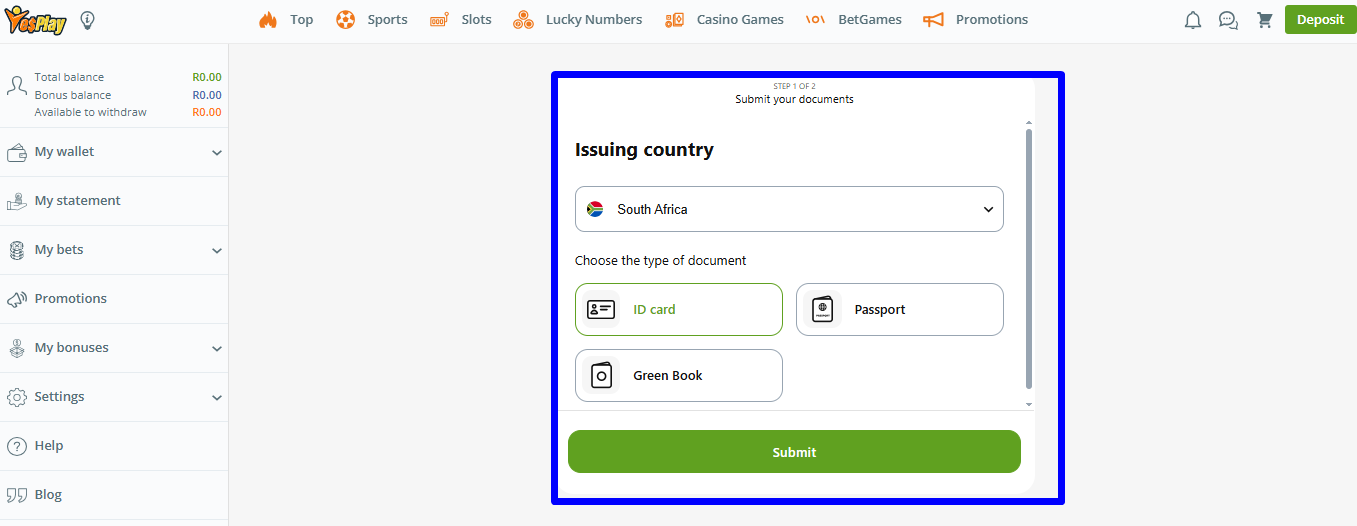
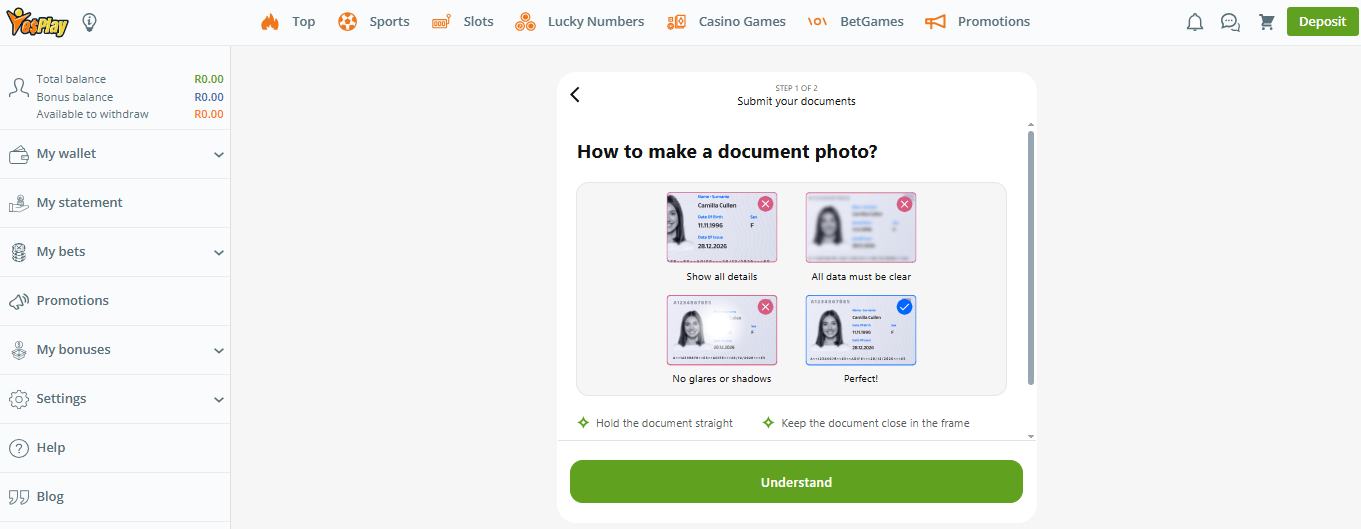
  4. Upload clear scans of either your ID, Passport, or Green Book;
  5. Click Submit;
  6. Wait for confirmation;
4

How Long Does YesPlay Take to Verify FICA Documents?

It usually takes 24 to 48 hours for yesplay to verify your FICA documents.

However, there can be delays if you have provided expired, blurry, incomplete, or documents that do not match the details in your account. Be sure to double-check your documents before uploading them.

5

Can You Use Yesplay without FICA Verification?

No, you cannot deposit, withdraw, or bet without FICA on Yesplay. Here are some of the limitations for unverified accounts:

  • Restricted deposits;
  • Blocked withdrawals;
  • Limited account features;
Sign up with Yesplay
6

YesPlay FICA Documents for Withdrawal

To make any withdrawal on Yesplay, you must submit your FICA documents - a valid ID and proof of address to complete the verification process.

Yesplay FICA documents withdrawal is a must before any withdrawal can be approved on the platform. The documents you provide for verification must match your registration data. No withdrawal without FICA can happen since Yesplay does not process payments to unverified accounts.

7

YesPlay FICA Bonus: Is There Any?

Currently, Yesplay does not provide a specific FICA bonus. However, all verified users can access other promotions on the platform, like a 100% welcome bonus up to R3,000, 10% Cashback, and Drop & Wins.

8

Yesplay FICA Submission Dos and Don’ts

  • Submit eligible, uncropped scans
  • Ensure your name matches your Yesplay profile
  • Upload files in supported formats like PNG, JPG, PDF
  • Don’t upload screenshots
  • Don’t upload expired documents
  • Don’t submit blurry images
  • Don’t submit handwritten proof of address
9

What Happens If You Don’t Complete FICA on YesPlay

If you don’t complete FICA on Yesplay, your account will remain restricted. Players with unverified accounts cannot bet, deposit, or withdraw money. These are the limitations for unverified accounts:

  • Not eligible for bonuses;
  • Limited account features;
  • You cannot place bets;
  • Deposits and withdrawals are not allowed;
10

Can You Update Your FICA Documents on YesPlay?

Yes, users can update their FICA documents on Yesplay under the account settings. There are several reasons why a user might want to update their FICA documents. For instance, it could be that you have a new address, an expired ID, or have changed your legal name, among others. Here are some quick steps on how you can update your documents:

  1. Log in to your Yesplay account,
  2. Go to the Verify section;
  3. Upload your new FICA documents and submit;
Sign up with Yesplay
11

Conclusion

FICA is a mandatory process on Yesplay as required by South African law. Yesplay users need to upload their ID and proof of address for verification. You cannot bet, deposit, or withdraw without FICA. Upload your Yesplay FICA documents today and enjoy full access to the platform.

12

FAQs

Nothing was found for your query :(
Also ask
What is FICA?
FICA or Financial Intelligence Centre Act is the requirement for users to verify their account on Yesplay to comply with the laws of South Africa.
How to send FICA documents on Yesplay?
You can choose to email your documents to Yesplay customer support or upload them through your account section.
How to Withdraw money from Yesplay?
To withdraw money from Yesplay, you need to complete FICA verification. Once your account is verified, you can use the withdrawal method provided.
How long does a YesPlay withdrawal take to Standard Bank?
Yesplay withdrawals to Standard Bank typically take 24 to 48 hours to be processed.
How much can you withdraw from the YesPlay bonus?
Yesplay bonus withdrawal limits depend on the bonus terms and conditions.
Is it possible to bet without FICA?
No, you cannot bet on Yesplay without completing FICA.
Can you withdraw money from YesPlay without FICA?
Withdrawals on Yesplay are restricted to unverified accounts. Complete FICA verification and enjoy seamless withdrawals.
How do I submit my FICA documents on YesPlay?
When verifying your ID, you will see the option to upload a copy of your ID Card, passport, or Green Book for verification.
13

Author

Alisa Barladyan
Alisa Barladyan
Editor-in-Chief
Comments
No Comments Yet! Be the first to share what you think!
This website uses cookies
This provides customers with a personalized experience and increases the efficiency of visiting the site, allowing us to provide the most efficient service. By using the website and accepting the terms of the policy, you consent to the use of cookies in accordance with the terms of this policy.